Pitchcut is built around one idea: the match already happened, so the work afterwards should be small. Here is the whole journey, in the order it happens.
1. Film the match
The best view of a grassroots pitch comes from height and from the halfway line. Many clubs mount two action cameras side by side on a mast there, angled so their views overlap and between them cover the whole pitch. You press record before kick-off and stop after the final whistle. A phone or a single camera works too, and gives you the footage as it was filmed. The practical details, such as what kit is worth buying, are in the kit questions on the FAQ.
2. Upload
Anyone at the club who is allowed to can upload from the match’s page: choose the files from the memory card, as they are. Pitchcut sends them in pieces, so a dropped connection resumes where it stopped instead of starting a very large file again, and it tells you, file by file, when each one is safely in storage. After that you can close the app. Nothing more is needed from you for the match to be processed. If an upload does stall, the FAQ says what to do.
3. One match video
When a match was filmed on two cameras, Pitchcut lines the two recordings up in time and joins them into a single wide picture of the whole pitch, a panorama, so nobody has to choose which camera to watch or notice where one ends and the other begins. This is classical image matching, not guesswork: it finds where the two views overlap and lines them up. Club staff review the framing before the video is released to players.
Players and families watch this finished match video. The raw camera files stay with the club’s staff. How long processing takes, and who can see the footage, are in the FAQ under processing and who sees footage.
4. Cut the moments
The match page plays the whole game in one viewer. To make a clip, you move to the moment, set where it starts and ends, and save. You can crop in on the action, straighten a tilted horizon and turn a sideways recording the right way up. The clip is cut from the original footage, not from a shrunken copy, so a goal looks as good as the footage allows, and each clip is kept once rather than as a copy per person.
A few details make this work for a whole club rather than one editor:
- Anyone on the team can clip. Staff and players can both clip, and a player clips their own team’s matches.
- A moment shows once. If fourteen parents cut the same goal, the feed shows the goal once, and the match timeline shows which stretches already have a clip, so nobody has to hunt for a goal a team-mate already cut. Taking your own angle on it is still allowed.
- Clips can name the people in them: the scorer, the assist, the keeper. Who may see a clip, and whether it can be made public, follows each player’s choices; the principle and the detail are in the privacy policy’s Consent section.
5. The squad sheet and stats
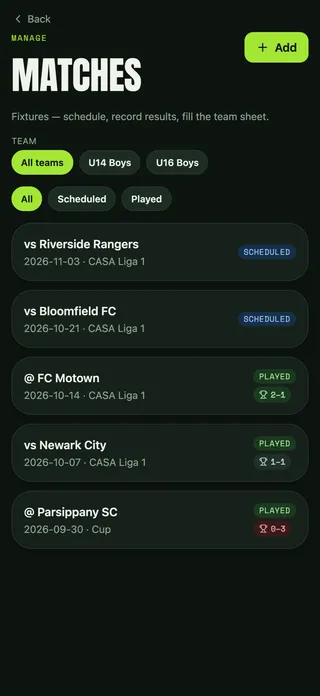
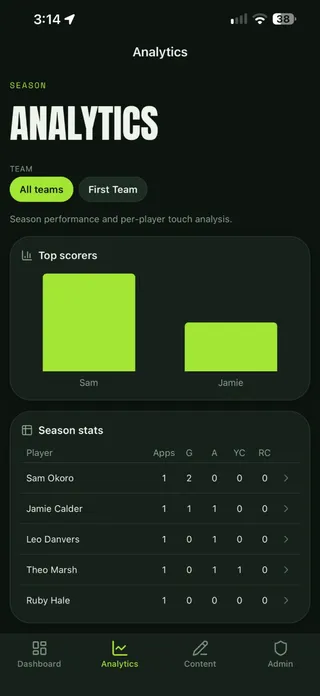
After the match, a coach opens the match’s squad sheet and ticks who played. For each player they can add goals, assists, yellow cards and red cards. Minutes and who started are not asked for. That one sheet is the source of everything statistical: each player’s season line (appearances, goals, assists and cards), the season table staff see, and the team and club leaderboards players see. If a goal was entered wrongly, fixing the sheet fixes every number built from it.
A player’s stats appear on leaderboards beyond their own club only under their own choices, set out in the privacy policy’s Consent section.
6. Posts drafted for you
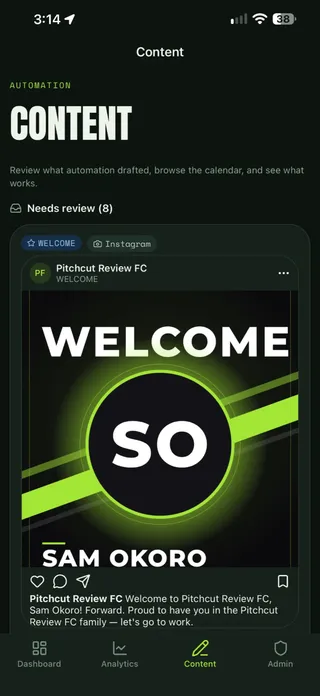
Saving things the club was going to record anyway drafts the posts. A new player on the roster gets a welcome post and a birthday post, once their choices allow it. A scheduled fixture gets an announcement. Saving a result or a squad sheet drafts the result post, naming the scorers from the sheet. Milestones such as a first goal or a round number of appearances get their own. Each post comes with a card drawn in the club’s colours and a written caption, and lands in a review queue.
7. A person decides
Nothing Pitchcut drafts goes out by itself. Someone at the club reads each post, edits it if they want, and approves or rejects it. The footage side of the same rule is that a player who has not agreed to appear is left out of drafts and feeds automatically; the Consent section explains the choices. After approval, the club takes the card and caption and posts them from its own Instagram or TikTok account; Pitchcut never has your password and does not post for you.
What happens next
If you are a coach or a parent, what each role gets shows you your side of this. If you want to know where Pitchcut came from and what it deliberately leaves out, read about.